Solitaire Dragons
- 4.6
- Rating
- 5.00M
- Installs
- Free
- Price
 Analysis by App-foxy
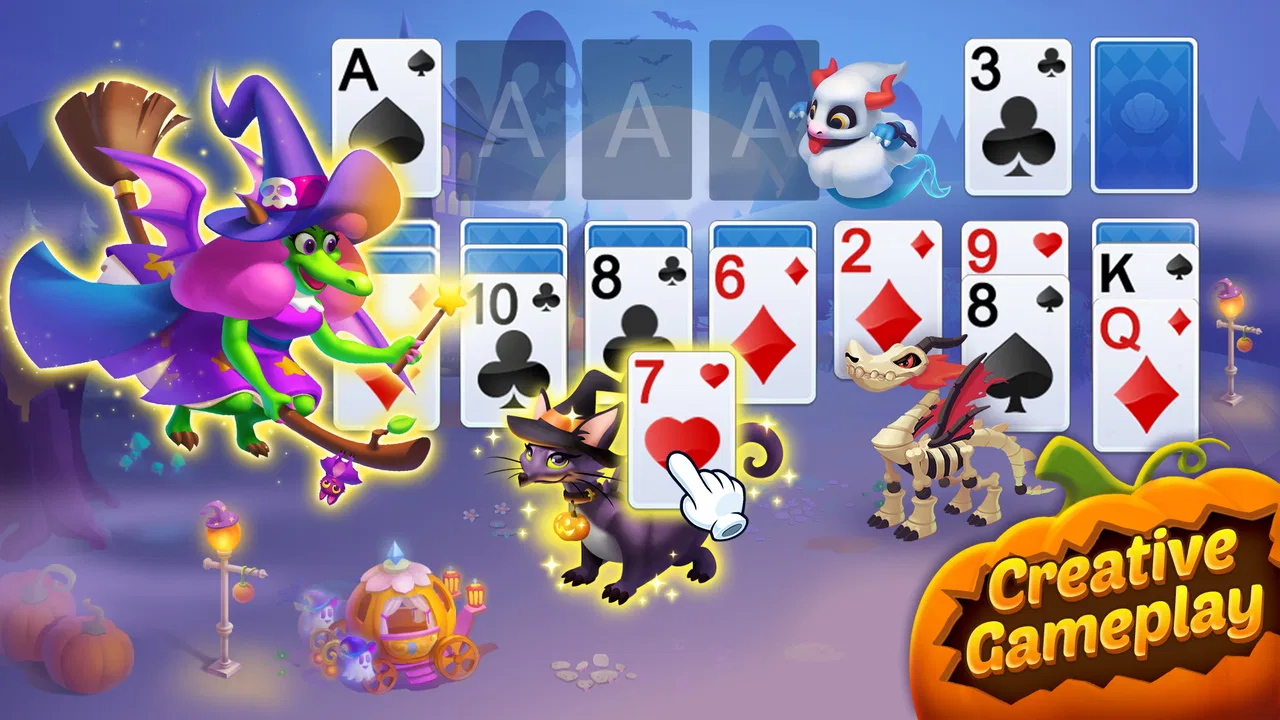
Solitaire Dragons is the kind of card game I open when I want something familiar but less plain than a traditional solitaire app. It combines solitaire puzzles with dragon hatching and island building, so each completed round feeds into a broader sense of progress. That combination gives the game more personality than a standard deck-and-score experience, although it also means there is more to keep track of than simply clearing cards.
Playdayy has made this a free game for everyone, with optional in-app purchases ranging from $0.99 to $79.99 per item. It belongs firmly in the casual card category, but the surrounding collection and building elements make it feel closer to a light progression game than a bare solitaire utility. After spending time with it, I think its strongest audience is people who enjoy short card sessions and like seeing a world develop around their wins.
Where players are most likely to get stuck
The first adjustment is understanding that a successful solitaire move is not always the same thing as a good long-term move. When I play a conventional solitaire app, I tend to focus on exposing hidden cards and emptying columns as quickly as possible. Here, that instinct still helps, but the game’s wider progression can make a session feel less direct. You are not only solving the current layout; you are also working toward the next piece of the dragon-and-island experience.
You May Also Like

 Blood Strike: 2.5 Anniversary
Blood Strike’s Loadouts Turn Every Drop Into a Tactical Gamble
A close look at Blood Strike’s custom loadouts: how fast access to signature weapons reshapes its battle royale rhythm, rewards preparation, and narrows the gap between fights.

 Pandora - Music & Podcasts
Pandora’s Music Is Easy to Start, but Harder to Recover
Pandora’s strength is its low-effort path from a seed to a station. Its weak spot is how much confidence it asks you to place in connection, setup, and quiet recovery.

 8 Ball Pool
 Is Built on Rivalries, Rematches, and Routine
A close look at the rivalries, rematches, shared routines, and unanswered safety questions that turn a quick pool match into a persistent mobile community.

 Samsung Music
’s Quiet Strength Is Playing What You Already Own
Its reach comes less from spectacle than from dependable access to a personal library. That simplicity is both the app’s strongest retention engine and its ceiling.

 AccuWeather: Weather Radar
AccuWeather Review: A Quick, Clear Forecast for Everyday Decisions
For everyday plans, the best forecast is the one you can understand quickly. AccuWeather makes rain timing, radar, and local conditions easy to act on, with a few trade-offs.

 Hill Climb Racing
Why Hill Climb Racing Still Turns Crashes Into One More Run
A tiny car, a bumpy hill and one more upgrade: Hill Climb Racing keeps resurfacing because its simple chaos makes every near-miss feel personal.
More From Our News Desk



New players may also hesitate when the board seems to offer several legal moves. My practical rule is to favor moves that reveal a covered card or create a useful empty space, rather than immediately building the longest visible sequence. A move that looks impressive can leave fewer options afterward. I take a moment to inspect the whole tableau before tapping, especially when two cards are equally playable.
Another source of friction is the difference between a puzzle being difficult and a session simply having reached an awkward position. Solitaire layouts naturally produce moments where the next useful card is buried or the available sequence becomes narrow. I do not treat every stalled board as a design problem. Sometimes the better response is to undo a recent choice, reconsider the order of moves, or start the puzzle again with a different opening.
The dragon and island layer can also distract from the card objective. It is appealing to check the growing setting after a round, but constantly switching away from the board can break concentration. I get better results by finishing a short run of card puzzles first, then spending time with the surrounding progression. That separation makes the game feel calmer and helps me notice whether I am actually improving at the card layouts.
Reading the board before making the obvious move
One useful habit is to count opportunities rather than cards. If moving one card exposes a face-down card while another move only extends an existing stack, I usually choose the revealing move. This is not a guaranteed solution, but it keeps the board flexible. I also avoid filling an empty column too quickly if doing so would trap a king or remove a valuable place to maneuver.
When I am close to finishing, I slow down instead of relying on rapid taps. The final few moves can be surprisingly easy to spoil because an automatic-looking sequence may use a card that is needed elsewhere. The game is most enjoyable when I treat each layout as a small planning exercise rather than a reflex challenge.
Setup checks that prevent avoidable frustration
Before blaming a puzzle or the game itself, I check the basics. Solitaire Dragons requires Android 6.0 or later, so an older device may be the first obstacle. On a compatible phone or tablet, I make sure the game has finished installing properly and that the device has enough free space for normal app operation. These are simple checks, but they save time when a game opens slowly, closes unexpectedly, or fails to complete an update.
I also recommend launching it once while using a stable connection, particularly after installation or an update. Even when the main activity is a card puzzle, a game with a progression layer may need to complete initial setup before every screen behaves normally. If the first launch appears stuck, I wait briefly, close other demanding apps, and try again rather than repeatedly tapping the same control.
The current version is 1.0.89, and keeping the installed version current is sensible. Updates can affect loading and compatibility, so an issue that appears after an interrupted installation may not reflect the normal experience. I check the device’s app store update screen, confirm that the update completed, and then restart the game. If the problem remains, restarting the device is a more useful next step than immediately removing the app.
Notifications and purchase prompts are another part of the setup experience worth handling deliberately. Because the game is free but includes optional purchases, I prefer to decide in advance whether I want to spend anything. A casual player can enjoy the card loop without treating every offer as part of the objective. If a child is using the device, I would also review the device’s purchase controls before handing it over, even though the content rating is Everyone.
Making the first sessions easier to manage
I find it helpful to begin with short sessions rather than trying to push through every available activity at once. The card board teaches the most important habits: expose hidden cards, preserve flexibility, and avoid wasting an empty space. Once those decisions feel natural, the dragon-hatching and island-building elements become a pleasant reward structure instead of another thing to learn simultaneously.
For a shared tablet, I would keep the game associated with the intended device profile and avoid switching accounts while progress is being made. This is general device hygiene rather than a special feature of the game, but it matters in any progression-based title. If several people use the same hardware, confusion about which account is active can make progress or purchase history seem inconsistent.
I also keep an eye on battery and heat during longer play. A card game is easy to underestimate because each round looks lightweight, but the surrounding visual activity can still make extended sessions less comfortable on an older device. Lowering general device brightness and closing unused apps is a straightforward way to make a long session easier without changing how the game is played.
Recovering a stalled workflow without losing patience
When a round stops making sense, my first recovery step is to retrace the last few moves mentally. I look for the moment when I placed a card into a column, moved a sequence too early, or used a high-value space without considering what it would block. If the game provides an undo action in the current puzzle, that is the safest way to test a different line. I use it as a learning tool rather than repeatedly undoing every move at random.
If the board is genuinely exhausted, restarting can be more productive than forcing it. The point is not to preserve every attempt; it is to learn which opening choices create room later. I pay particular attention to whether I have exposed enough hidden cards before building long visible runs. That small change in workflow has helped me more than simply playing faster.
For a loading issue, I follow a conservative sequence: return to the main screen if possible, close the game, reopen it, and then restart the device if necessary. I avoid clearing storage or uninstalling immediately because those actions can create new problems for a progression game, especially if I have not confirmed how the device handles saved progress. A clean restart is usually the least disruptive first response.
If a purchase screen behaves unexpectedly, I stop before confirming anything and check the device’s payment settings. I do not tap repeatedly when a transaction appears delayed. Waiting for the store interface to respond, then checking whether an order actually completed, is safer than creating duplicate requests. This is particularly important because individual purchases can range from small amounts to $79.99, so a moment of caution is worthwhile.
Separating a puzzle mistake from a technical problem
A useful test is consistency. If only one difficult layout feels impossible, I treat it as a strategy issue. If several unrelated screens fail to load, buttons stop responding across the game, or the app closes during ordinary navigation, I consider a technical cause more likely. That distinction keeps me from abandoning a game because of one bad round, while still taking repeated instability seriously.
I also avoid changing several things at once. If I update the app, clear its temporary data, restart the phone, and change network settings in one go, I will not know what helped. I prefer one change followed by a fresh test. This is slower for a minute, but it produces a clearer answer and reduces the chance of disturbing working settings.
When contacting support becomes necessary, I would record the device model, operating system version, the game version, and the exact point where the problem occurs. A short description such as “the island screen does not open after completing a puzzle” is more useful than “it is broken.” I would also note whether the issue happens on every launch or only occasionally. These details make troubleshooting more focused without requiring guesswork.
When the app is not the right cause—or the right choice
Not every disappointing experience means the game is malfunctioning. A poor network connection can interrupt setup or make a progression screen feel slow. Limited device storage can interfere with updates. An overloaded phone can cause an otherwise stable game to close. Before reinstalling, I check those conditions and make sure the operating system meets the minimum requirement.
There is also a personal preference issue. If you want a completely quiet solitaire tool with no broader collection, no hatching theme, and no building layer, this may feel busier than necessary. A traditional solitaire app is a better fit for someone who wants to open a board, play a hand, and leave without engaging with a developing world. I would choose that alternative for quick concentration during a commute or for a device used mainly as a simple card-game station.
On the other hand, players who lose interest in repetitive card layouts may appreciate the extra context here. The dragon and island elements give completed puzzles a reason to matter beyond a score or win counter. I would recommend it to someone who likes gentle collecting and visible progression but does not want the intensity of a competitive card game.
The free entry point is convenient, but optional purchases change how some people will judge the experience. I am comfortable ignoring offers when they are clearly optional, yet players who dislike any purchase prompts may find them distracting. I would not install this expecting every part of the progression to feel entirely separate from monetization. The sensible approach is to decide on a spending limit before playing and treat purchases as optional extras rather than necessary steps.
Its Everyone rating makes it approachable for a broad audience, but that does not mean every age group will enjoy the same aspects. Younger players may be drawn to the dragons and island, while adults may stay for the familiar solitaire decisions. For family use, I would still supervise purchase settings and explain that tapping an appealing item is not automatically free.
Everyday situations where it works best
My favorite use case is a ten-minute break when I want a defined activity without committing to a long match. I can play a puzzle, stop at a natural point, and return later without needing to remember a complicated story. The card format also works well when I want something more active than scrolling but less demanding than a strategy game.
It can suit a quiet evening too, especially if I approach the island and dragon progression at my own pace. I do not need to optimize every decision or chase a perfect run. The combination is most appealing when I want small rewards around a familiar card framework, not when I am looking for deep deck construction, multiplayer competition, or a highly complex campaign.
For travel, I would test the game before relying on it as an offline distraction. I prefer not to assume that every surrounding screen will behave identically without a connection. A quick pre-trip launch and a completed test round can reveal whether the parts I intend to use are ready. That small check is more reliable than discovering a setup requirement after boarding a train or plane.
My practical verdict after living with the hybrid design
Solitaire Dragons succeeds because the underlying card activity is instantly understandable while the dragons and island give each session a little more purpose. Playdayy has aimed at players who want the comfort of solitaire without the emptiness that can follow a single completed hand. I like that balance, particularly for short sessions where I want progress but not pressure.
The game has attracted a substantial audience, with a 4.6 average from around 185 thousand ratings and over 5 million installs. Those figures suggest that the mixture has broad appeal, but they do not remove the need to match the game to your habits. I would not choose it for a pure, distraction-free solitaire experience, and I would be cautious if optional purchases are a major annoyance for you.
My strongest advice is to learn the board before chasing the surrounding rewards. Expose hidden cards, protect empty columns, and reconsider the last few moves when a layout stalls. During setup, use Android 6.0 or later, keep the game updated, and test important screens after installation. If something goes wrong, restart calmly and distinguish a single difficult puzzle from a problem that affects the whole app.
For me, the best reason to try it is the specific blend: recognizable card puzzles, a collectible-feeling dragon theme, and an island that gives wins a visible destination. The weakest point is that this blend will not please players who want solitaire stripped to its essentials. If you enjoy casual progression and can ignore or control optional spending, this is a friendly card game with enough structure to keep ordinary breaks interesting.
It is free to start, rated Everyone, and developed by Playdayy, so the barrier to trying it is low on a compatible device. I would install it for a friend who likes solitaire but wants more atmosphere around each completed puzzle. I would steer a minimalist toward a conventional solitaire alternative instead. That distinction captures my final view: Solitaire Dragons is not the purest solitaire experience, but its extra layer is exactly what makes it worth considering.
FAQs for Solitaire Dragons
01What is Solitaire Dragons and how does it differ from traditional solitaire games?
Solitaire Dragons is a unique twist on the classic solitaire game, combining card-based strategy with an engaging dragon-themed adventure. Unlike traditional solitaire, this game incorporates a storyline where players can hatch and evolve dragons as they progress through levels, adding a layer of excitement and variety to the gameplay.
02Is Solitaire Dragons free to play, or are there in-app purchases?
Solitaire Dragons is free to download and play, offering a variety of levels and features at no cost. However, it does include in-app purchases that allow players to buy additional items, such as power-ups and special dragons, which can enhance the gaming experience and help progress more quickly.
03What are the system requirements for Solitaire Dragons on Android and iOS?
To run Solitaire Dragons smoothly, Android users should have a device with at least Android 5.0, while iOS users need iOS 10.0 or later. The app is optimized for both smartphones and tablets, ensuring a seamless experience across different devices with sufficient storage and processing capability.
04Can Solitaire Dragons be played offline?
Yes, Solitaire Dragons can be played offline, making it a perfect game for travel or situations without internet access. However, some features, such as in-app purchases and certain updates, do require an internet connection to function properly, so players should connect periodically.
05How does the dragon evolution system work in Solitaire Dragons?
In Solitaire Dragons, players collect dragon eggs by completing levels. As you progress, these eggs can be hatched and evolved into powerful dragons, each with unique abilities that can aid in gameplay. The evolution system adds depth to the game, encouraging players to strategize and unlock different dragons.
Pros
- Engaging and colorful graphics.
- Variety of challenging levels.
- Easy to learn controls.
- Offline play available.
- Frequent updates with new content.
Cons
- In-app purchases can be pricey.
- Occasional ads interrupt gameplay.
- Requires a stable internet connection.
- Limited customization options.
- Some levels feel repetitive.

Solitaire Dragons
Gallery